

Appearance
Single Product & Order Setup
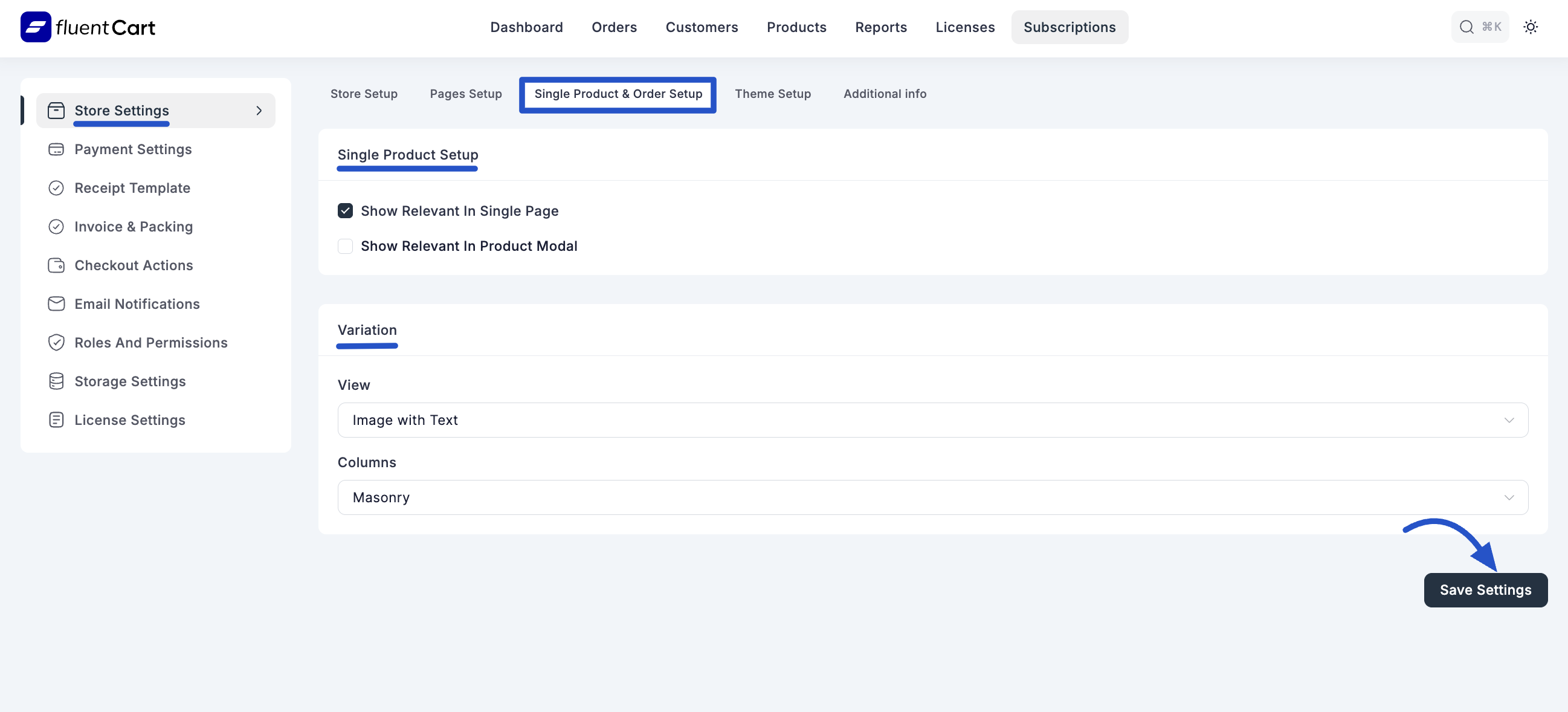
The Single Product & Order Setup screen in FluentCart allows you to fine-tune how individual product pages are displayed on your storefront and configure certain general settings related to order management.
Accessing Single Product & Order Setup
From your WordPress dashboard, navigate to FluentCart Pro > Settings in the left sidebar.
Click on the "Single Product & Order Setup" tab.
Configuration Options
1. Single Product Setup
These settings control how additional information is presented on your individual product pages and within product pop-up modals.
- Show Relevant In Single Page: Check this box to display relevant related information (e.g., related products, additional details) on your product's dedicated single page.
- Show Relevant In Product Modal: Check this box to display relevant information within product pop-up modals (if your theme or other plugins use them for quick product views).
2. Variation Display
This section defines how product variations (e.g., different sizes, colors, license tiers) are visually presented to customers.
- Options:
- Image with Text: Displays both an image and text for each variation.
- Image: Displays only an image for each variation.
- Text: Displays only text for each variation.
- Columns: You can set the column layout for how products are displayed on shop pages or within certain product sections.
- Masonry: A grid layout where items are arranged without fixed height rows.
- Two Column: Displays products in two columns.
- Three Column: Displays products in three columns.
- Four Column: Displays products in four columns.
Saving Your Settings
After making any changes to your Single Product & Order Setup, remember to click the "Save Settings" button at the bottom right of the screen to apply your configurations.